I am pleased to inform that StarFinder for BB10 is now Built For Blackberry approved.
This means that it has been positively verified for full compliance with all BlackBerry criteria when it comes to UI design, power and resource efficiency, user expierience, code quality, security, functionality, etc.
StarFinder and MoonCalc are the only astronomical applications for BB10 with the Built For BlackBerry designation.
StarFinder is available in the BlackBerry World
czwartek, 15 stycznia 2015
poniedziałek, 5 stycznia 2015
MoonCalc for BB10 now Built For BlackBerry approved
I am pleased to inform that MoonCalc is now Built For Blackberry approved.
This means that it has been positively verified for full compliance with all BlackBerry criteria when it comes to UI design, power and resource efficiency, user expierience, code quality, security, etc. It is the only Moon tracking tool for BB10 with the BFB designation.
Additionally, the most recent version includes True North / Magnetic North selection for compass. If True North is selected, local magnetic variation (declination) is obtained and added to compass readings, which makes it point to the geographic North (and thus also to Astronomic North as the tiny difference between them is negligible).
MoonCalc is available in the BlackBerry World
This means that it has been positively verified for full compliance with all BlackBerry criteria when it comes to UI design, power and resource efficiency, user expierience, code quality, security, etc. It is the only Moon tracking tool for BB10 with the BFB designation.
Additionally, the most recent version includes True North / Magnetic North selection for compass. If True North is selected, local magnetic variation (declination) is obtained and added to compass readings, which makes it point to the geographic North (and thus also to Astronomic North as the tiny difference between them is negligible).
MoonCalc is available in the BlackBerry World
StarFinder 2.2 update for BB10
StarFinder for BB10 has been updated again to version 2.2. Changes:
** Dynamically updated (every 30 secs. to save power) Active Frame showing currently selected object's image, rise/set times, azimuth and elevation when the application is minimized.
** Share feature to easily share currently selected object's astronomical data by email, SMS, via social media, with other applications, etc.
** True North / Magnetic North selection for compass. If True North is selected, local magnetic variation (declination) is obtained and added to the compass reading, which makes it point to the geographic North (and thus also to Astronomic North as the tiny difference between them is negligible).
** Sort lists of stars and deep sky objects either alphabetically or by brightness (visual magnitude)
** Additional yellow needles on compass and elevation indicator, showing phone's current orientation. They move as you rotate/raise the phone. When those yellow arrows and the red arrows (showing selected object's azimuth and elevation) overlap, they change the color to green and the selected celestial object is right behind the phone. Makes using the program simpler and more obvious.
** An option to disable background picture
** Various other tweaks and improvements.
Some screenshots:
StarFinder is available in the BlackBerry World
** Dynamically updated (every 30 secs. to save power) Active Frame showing currently selected object's image, rise/set times, azimuth and elevation when the application is minimized.
** Share feature to easily share currently selected object's astronomical data by email, SMS, via social media, with other applications, etc.
** True North / Magnetic North selection for compass. If True North is selected, local magnetic variation (declination) is obtained and added to the compass reading, which makes it point to the geographic North (and thus also to Astronomic North as the tiny difference between them is negligible).
** Sort lists of stars and deep sky objects either alphabetically or by brightness (visual magnitude)
** Additional yellow needles on compass and elevation indicator, showing phone's current orientation. They move as you rotate/raise the phone. When those yellow arrows and the red arrows (showing selected object's azimuth and elevation) overlap, they change the color to green and the selected celestial object is right behind the phone. Makes using the program simpler and more obvious.
** An option to disable background picture
** Various other tweaks and improvements.
Some screenshots:
StarFinder is available in the BlackBerry World
poniedziałek, 8 grudnia 2014
MoonCalc for BB10 now with Share function and an Active Frame
Another update of MoonCalc (1.3.0) has been submitted to BB World and should be available within a day or two.
This new update brings the following features:
- when minimized, the application now shows an Active Frame displaying current Moon data (phase name and image, illumination percentage, rise/set times, azimuth, elevation). It is dynamically updated every 30 seconds
- Share function in the menu to quickly and easily share current Moon data by email, SMS, on Twitter, Facebook, with other applications (e.g. Remember), etc.
Some screenshots:
This new update brings the following features:
- when minimized, the application now shows an Active Frame displaying current Moon data (phase name and image, illumination percentage, rise/set times, azimuth, elevation). It is dynamically updated every 30 seconds
- Share function in the menu to quickly and easily share current Moon data by email, SMS, on Twitter, Facebook, with other applications (e.g. Remember), etc.
Some screenshots:
sobota, 22 listopada 2014
MoonCalc for BB10 rewritten in Cascades
MoonCalc is an advanced Moon tool providing rich, real time calculations of Moon phase, age, illumination, distance, apparent size, coordinates (right ascension, declination, ecliptic latitude and longitude), azimuth, elevation, moonrise and moonset times, perigees and apogees, Moon Compass, and more - for any location and date/time. It also shows Moon position in the sky on an interactive graph.
Previously available for BB10 as a Qt/QtQuick application, it has just been rewritten from scratch in Cascades so now it is a fully native BB10 Cascades application, compatible with all BB10 devices, screen resolutions and OS versions.
This new version additionally provides the following features:
- BlackBerry Passport (1440x1440 pixels)
- Q10 / Q5 / Classic (720x720 pixels)
Previously available for BB10 as a Qt/QtQuick application, it has just been rewritten from scratch in Cascades so now it is a fully native BB10 Cascades application, compatible with all BB10 devices, screen resolutions and OS versions.
This new version additionally provides the following features:
- switch between kilometers and miles as distance unit (e.g. in Perigees/Apogees view)
- Moon elevation shown both with and without atmospheric refraction
- azimuth shown as both numeric value and direction (e.g. NNW)
- improved "Moon Path" graph
- various other tweaks and improvements.
Depending on interest, another update may come soon, bringing the following additions:
- list of all Super Moons in a selected year
- list of all moonrise/moonset times in a selected month
- Share function to quickly and easily share the calculated/shown data with other people or other applications
- Active Frame showing selected Moon data while the application is minimized.
Screenshots:
- Full Touch (Z10 / Z30)
- BlackBerry Passport (1440x1440 pixels)
- Q10 / Q5 / Classic (720x720 pixels)
This new version has just been submitted to the BlackBerry World store and should be available shortly after the weekend.
wtorek, 4 listopada 2014
StarFinder ported to BB10 Cascades
StarFinder, formerly available for BB10 as a Qt/QtQuick application, has just been fully ported to Cascades, so now it is a fully native Cascades application, very quick and 100% smooth. It works on all devices and OS versions.
Additionally, this new version also brings the following enhancements:
StarFinder is an application to instantly (within just a few seconds) and very easily (by simply following two indicators) locate astronomical objects (stars, constellations, galaxies, nebulae, planets, asterisms, meteor shower radiants, etc.) in the night sky. For all supported objects, StarFinder also provides a lot of their astronomical data calculated in real time (right ascension, declination, azimuth, elevation, hour angle, apparent magnitude, rise/set/transit times, distance from Earth and Sun, illumination (phase), elongation, apparent diameter, phase angle, etc.) and lots of other information.
Some screenshots:
- Full Touch devices
StarFinder is available in the BlackBerry World
Additionally, this new version also brings the following enhancements:
- an option to enable vibration and/or LED feedback when the phone is aimed at the right azimuth and elevation
- Night Mode dimming the display so that it's not dazzling in darkness. Night Mode can be swiched manually on or off, or set to Auto mode controlled by the Light sensor
- varius corrections and optimizations.
StarFinder is an application to instantly (within just a few seconds) and very easily (by simply following two indicators) locate astronomical objects (stars, constellations, galaxies, nebulae, planets, asterisms, meteor shower radiants, etc.) in the night sky. For all supported objects, StarFinder also provides a lot of their astronomical data calculated in real time (right ascension, declination, azimuth, elevation, hour angle, apparent magnitude, rise/set/transit times, distance from Earth and Sun, illumination (phase), elongation, apparent diameter, phase angle, etc.) and lots of other information.
Some screenshots:
- Full Touch devices
- BlackBerry Passport (1440x1440)
- Q10 / Q5 / Classic (720x720)
StarFinder is available in the BlackBerry World
poniedziałek, 20 października 2014
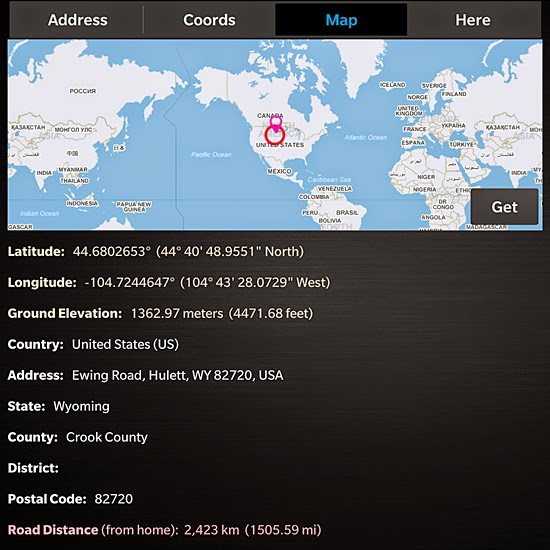
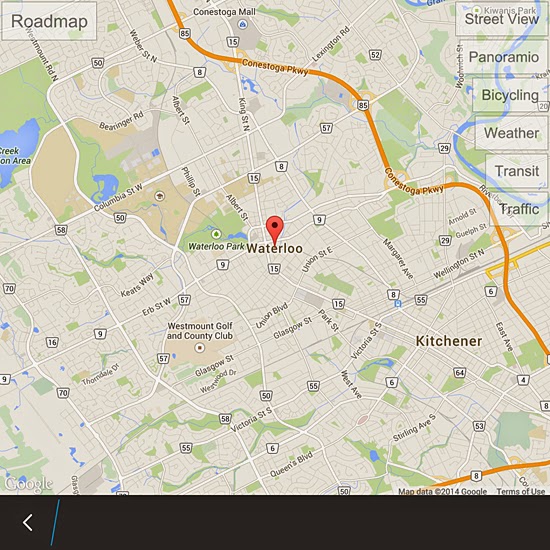
GeoCoder updated for the BlackBerry Passport, also adds Google Directions
GeoCoder Pro has been updated to support all devices with 1440x1440 and 720x720 pixel displays (including the new BlackBerry Passport and Classic), in addition to the already supported resolutions of 768x1280 and 720x1280. This means that GeoCoder now works on all BlackBerry smartphones.
Additionally, this new version brings preliminary support for Google Directions.
The new version has just been submitted to the BlackBerry World store for approval and should be available within a day or two.
Some screenshots:
Additionally, this new version brings preliminary support for Google Directions.
The new version has just been submitted to the BlackBerry World store for approval and should be available within a day or two.
Some screenshots:
Subskrybuj:
Posty (Atom)